Showing posts with label synchronization. Show all posts

Thursday, November 29, 2018

DIFFERENCE BETWEEN ‘@EVENT’ AND EVENT.TRIGGERED IN SYSTEMVERILOG

@EVENT:
- It is EDGE sensitive event. Event is sample by edge. @event should execute before event get trigger or it cause race condition.
- Consider scenario if ‘@event’ and ‘->event’ trigger at same time. @event looking for edge detection, until it will not detect next edge detection @event block the statements written below it.


USER WANTS CODE:

module edge_event;
event e; // event declaration
initial
begin
  repeat(1)
  begin
    #10; // SAME TIME
    ->e; // activate event or trigger event
  end
end

initial
begin
  repeat(2)
  begin
    #10; // SAME TIME
    @ (e) // check event trigger at CURRENT TIME slot
    $display("\n@%0t event is triggere\n",$realtime);
  end
end

initial
begin
  #50;
  $display("\nRACE Condition, statement is BLOCKED\n");
  $finish;
end
endmodule


To run simulation click on below link:

EVENT.TRIGGERED:
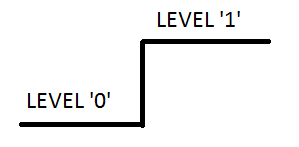
- It is level sensitive measurement. Event.triggered statement check LEVEL difference at CURRENT TIME slot.
- Consider scenario if ‘wait(event.triggered)’ and ‘->event’ trigger at same time. wait(event.triggered) looking for level difference in CURRENT TIME slot and execute the code written below it.


USER WANTS CODE:

module level_event;
event e; // event declaration
initial
begin
  repeat(1)
  begin
    #10; // SAME TIME
    ->e; // activate event or trigger event
  end
end

initial
begin
  repeat(2)
  begin
    #10; // SAME TIME
    wait(e.triggered) // check event trigger at CURRENT TIME slot
    $display("\n@%0t event is triggere\n",$realtime);
  end
end

initial
#50 $finish;

endmodule

To run simulation click on below link:
Link: https://www.edaplayground.com/x/3VXd

DIFFERENCE BETWEEN WAIT AND IF CONDITION
Wait: wait keyword use to blocking until condition is not satisfied.
Else keyword can not use with wait statement.
If: if keyword use to check the condition without any blocking.
Else keyword can use with if condition.


Saturday, October 27, 2018

wait_order of event in System Verilog


System Verilog provides the facility to execute an event in a specific order.

Application: In a pipeline structure, the user will receive requests in sequences. Now, according to the priority mechanism, execute the different process.

Example: Consider the entire packet frame structure. Design is producing frame structure with help of SOP(Start Of Packet), SOM(Start Of Message), EOM(End of Message) and EOP(End Of Packet) signal. The packet should follow the following order.


(1) SOP
(2) SOM
(3) EOM
(4) EOP

Irrespective of repetition of the same signal. All signals should assert to complete the entire frame.


USER WANT CODE:


module complete_frame;

event sop, som, eom, eop, start; // event name

initial

begin

 #20; // Activate exect pin

 -> start; // trigger event

 #10 -> sop; // start of packet so, assert event sop.

 #10 -> som; // start of message so, assert event som.

 #10 -> eom; // end of message so, assert event eom.

 #10 -> som; // start of message so, assert event som IGNORE

 #10 -> eom; // end of message so, assert event eom.

 #10 -> eop; // end of packet so, assert event eop.

end


always
begin
#10;
 if(start.triggered) // check traffic status
 begin
   $display(" Execute pin is activated at %t",$time);
   wait_order(sop, som, eom, eop)  // IMPORTANT: ALL EVENTS SHOULD assert.
   $display("\n Frame is completed function is WORKING at %0t",$time);
   else
     $error("Frame is NOT completed function is NOT WORKING at %0t",$time);
 end
 else
   $display(" Execute pin is Not activated at %t",$time);
end

initial
#100 $finish;

endmodule


To run simulation click on below link: 

Link: https://www.edaplayground.com/x/3ABa

Sunday, September 23, 2018

Event control in Systemveilog


Verilog event limitation:

- Verilog event is static object.
- Reclaiming and event comparison of event is not possible.
- Pre-define option to execute event in specific order.
- Non-blocking event not supported.
- Level trigger option is not present.

System verilog enhance event type of VERILOG. All the above limitations are overcome by systemverilog event.

- Event comparison.
- Reclaiming event/Deactivate event.
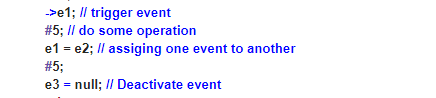
- In SV event variable can assign another event variable or NULL.

Few scenarios:

(1) Event variable assigns to another event variable, both event variables refer the same synchronization object.
(2) Event variable assign to null, event variable is broken.
- An event can pass in an argument in a task.
(3) Event variable compare with another event or check existence of event.


System verilog event advantages are justified in an example.


USER WANT CODE:


module main;

  event e1,e2,e3; // event declaration
  initial begin
    repeat(5)
      begin
        #10;
        ->e1; // trigger event
        #5; // do some operation
        e1 = e2; // assiging one event to another
        #5;
        e3 = null; // Deactivate event
      end
  end

  initial

    begin
      repeat(4)
        begin
          #5 if(e1.triggered) // waiting to trigger event
            $display("@%0t e1 event is triggered",$realtime);
          else
            $display("@%0t e1 event is not triggered",$realtime);
          if(e1 == e2) // EVENT COMPARISON
            $display("Event e1 and e2 are same event");
          else
            $display("Both events e1,e2 are NOT same event");
          if(e3 == null)  
            $display("e3 is NULL event");     
        end
   
    end

  initial

    #100 $finish;

endmodule


To run simulation click on below link:

Link: https://www.edaplayground.com/x/3cnU

Friday, August 31, 2018

Event control in Verilog

Requirement::
- Synchronization and Communication mechanism are essential to control the interaction between two processes.

Application:
- Last packet received, trigger the event to check update of status register value.
- Specific type packet received repeatedly based on that sample value for coverage.

Analogy:
- Traffic signal is the best example to explain event. Multiple vehicles are moving on the road. Now, to avoid accident traffic management system is required. So, need to block one root of the vehicles for certain time period. And later unblock the same and block the another root. Consider the traffic signal that block the vehicles for certain period of time. When timer is completed, signal will Unblock the vehicles.


USER WANT CODE:

module traffic_system;
event green_light; // to activate green light
initial
begin
  #20; // block the traffic
  ->green_light; // trigger event
  #10; // Unblock traffic
  $display(" green_light is asserted at %t ",$time);
end

always

begin
  #10;
  if(green_light.triggered) // check traffic status
    $display(" green_light is activated at %t",$time);
  else
    $display(" green_light is Not activated at %t",$time);
end

initial

#100 $finish;

endmodule


To run simulation click on below link:
Link: https://www.edaplayground.com/x/4Hny